Help centre / In-House Team
Stock & Parts: stores, van stock, reorders & parts on jobs
Track parts across stores and vans, record what each job used, and raise purchase orders when stock runs low.
In-House Team → Stock & Parts keeps a parts catalogue with quantities per location — a store or a van linked to an engineer.
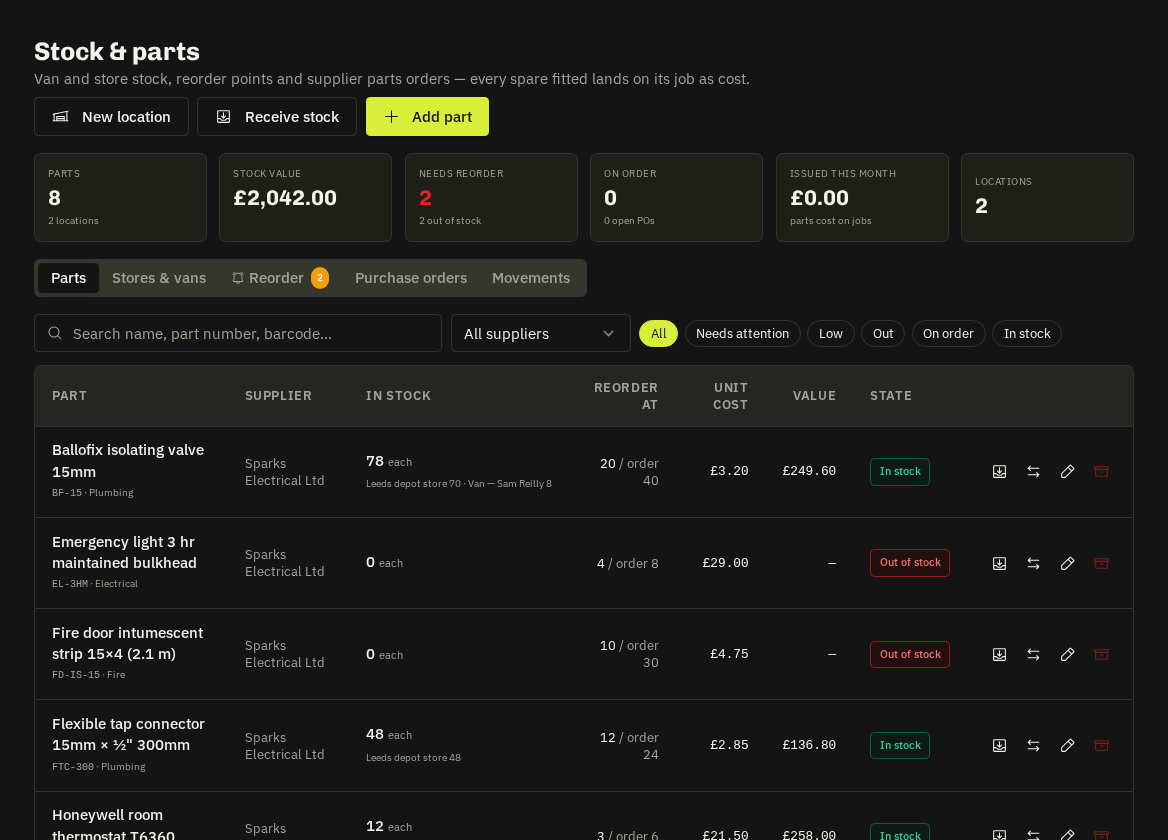
Tabs
- Parts — SKU, name, category, unit, unit cost, usual supplier, reorder at (minimum) and reorder quantity; quantity by location. Add from asset seeds parts from an asset's recommended spares.
- Stores & vans — locations; a van is tied to an operative so issues from it show on their jobs.
- Reorder — everything at or below its minimum, grouped by supplier, with Deliver to: tick rows → Raise PO (or Operative buys the parts → an in-house PO).
- POs — parts purchase orders
PPO-…: send to the supplier (e-mail or Mark as sent), receive in full or part into a chosen location, PDF, cancel. - Movements — receipts, issues, transfers, adjustments and returns, each linked to its job or PO.
Parts on jobs
The Parts panel on a job (office and engineer phone) picks a location, searches the part, enters the quantity and records an issue (or a return). Parts cost rolls up into the job's costs, budgets and job profit.
Tip: Low stock only ever notifies admins — nothing is ordered automatically; you raise the PO from the Reorder tab.
Related: In-house purchase orders · Asset register · Job profit