Help centre / Jobs & Works Orders
Works orders: accept, request changes or decline
Reading a works order and responding to it in one tap.
A works order is Fixlr's formal instruction to carry out work at an agreed price. You receive it by email with a PDF, and it appears on your dashboard under works orders awaiting response and in Works Orders.
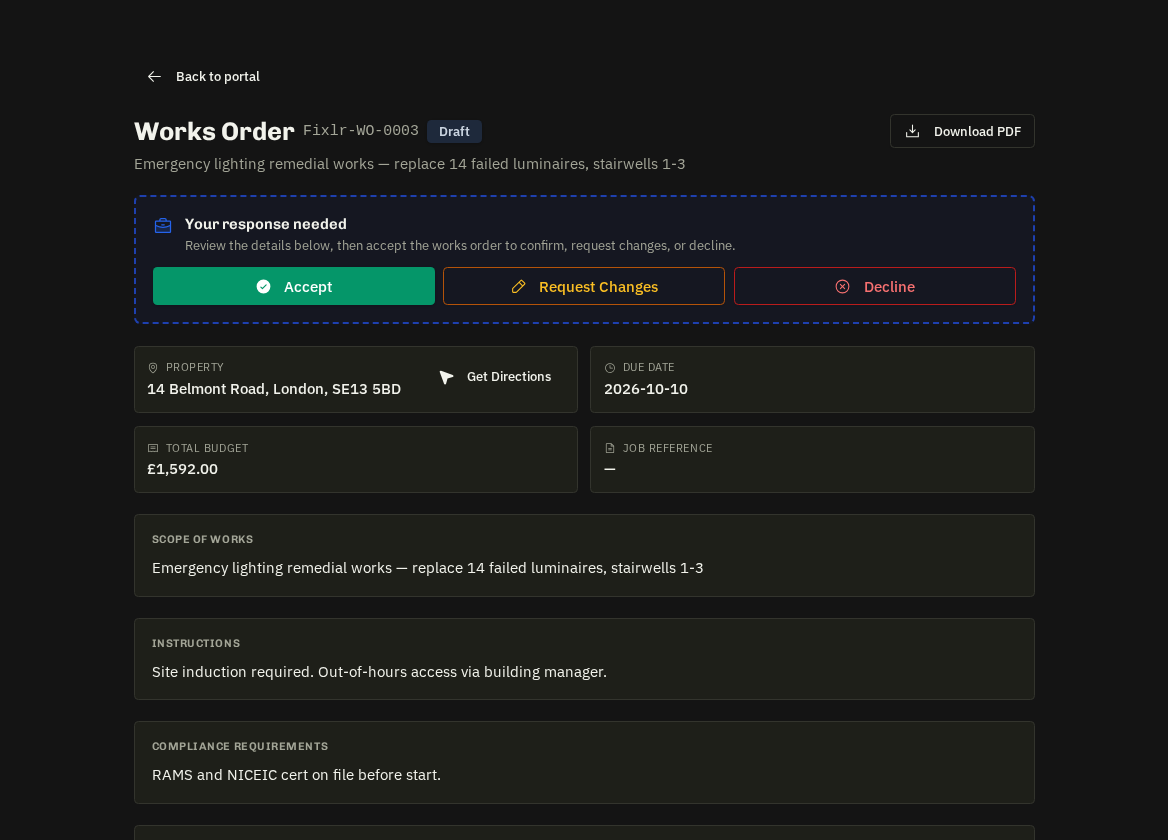
On the works order
The reference, priority and required completion date, Scope of Works, Instructions, Compliance Requirements (documents or standards you must hold), Line Items — your agreed cost lines with quantity, unit price and total — and, where the client has registered them, the property's access notes.
Respond (Your response needed)
- Accept — one tap. Fixlr is notified and the linked job moves forward.
- Request changes — enter what needs to change (dates, scope, price) and send. Fixlr reviews and issues a revised order.
- Decline — enter a reason. Fixlr will re-assign the work.
A reason is required for changes or a decline. Once you've accepted or declined you can't flip the decision yourself — ask Fixlr to amend the order instead. Revisions appear as new versions; the original stays on record.
Tip: response speed counts towards your SLA grade — respond the same day even if the answer is 'not this time'.
Related: Proposing and agreeing start dates · Your performance scorecard