Help centre / Compliance & Health
PPM planner: planned maintenance schedules & the task library
Statutory and routine maintenance on a calendar, with jobs created ahead of each due date.
CMMS → PPM planner turns recurring maintenance (gas safety, EICR, fire alarm tests, legionella, lift LOLER, boiler service…) into schedules that create jobs automatically.
Library
Ready-made tasks with category, frequency, statutory requirement flag, legislation or standard, duration and checklist steps. Add your own or adjust the defaults.
Schedules
New schedule → property (and optional asset), a library task or a custom one, frequency, first due, whether due dates follow a fixed calendar or float from the last completion, create job N days before due, duration, instructions for the engineer and an optional default engineer or supplier. Set up planned maintenance for a building applies a whole set of tasks to one property in one go (all statutory in a click).
Planner
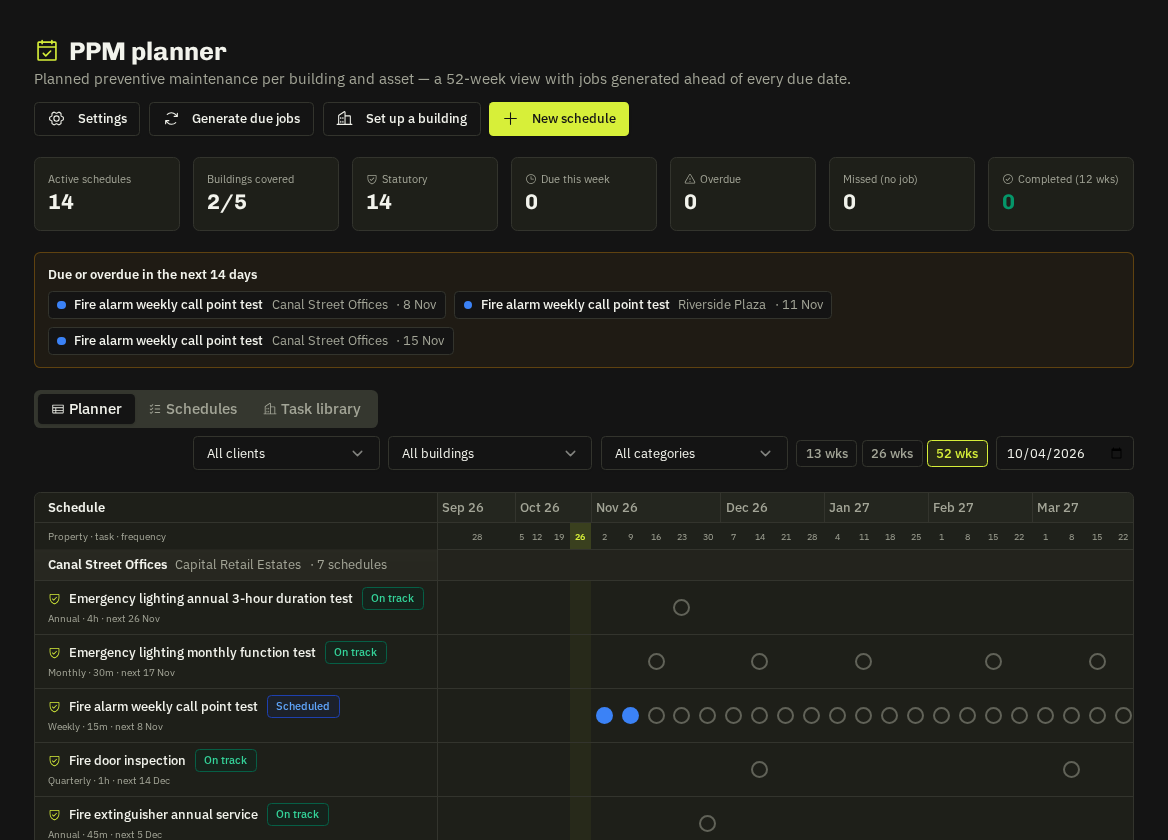
A week-by-week grid — property · task · frequency down the side — showing each occurrence's state: scheduled, job created, completed, overdue, missed (no job). From a cell: Create job now or Skip & cancel job. Tiles: active schedules, buildings covered, due this week, overdue, missed, statutory, completed in the last 12 weeks. Filters for client, building, category, statutory only and due or overdue in the next 14 days.
Completing the generated job marks the occurrence done and (for floating schedules) sets the next due date.
Related: Building compliance · Asset register · Predictive maintenance