Help centre / Getting Started
Welcome to My Work
Your portal in two minutes: the menu, the daily rhythm and where to get help.
My Work is your portal. It shows only what's assigned to you and gives you everything you need on site from your phone.
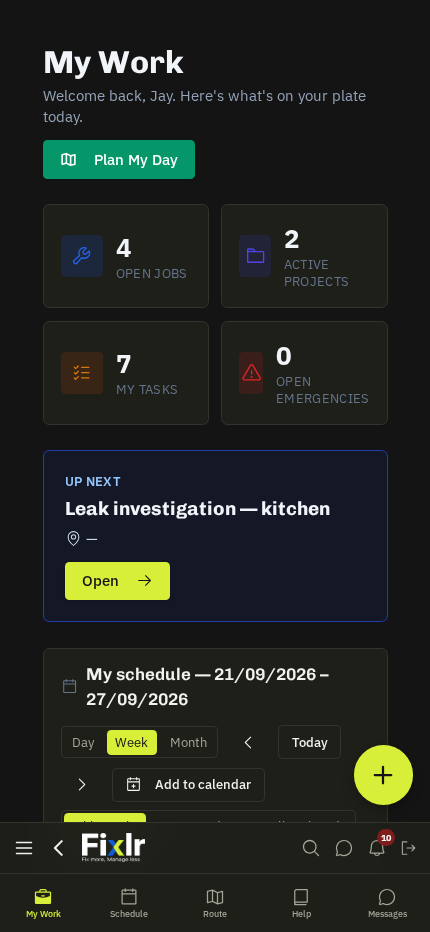
Menu
Left on desktop, bottom bar on phones: My Work (today's list), Schedule, Route Planner, Compliance (the company document library), Messages, WhatsApp and Alerts.
A typical day
- 06:30 — briefing email with your jobs and optimised route.
- Open My Work → tap the first job → read the instructions, access notes and required compliance.
- Arrive on site (the green banner offers one-tap check-in when you're within 500 m).
- Tick the checklist, take Before / After photos, fill any job forms.
- Log expenses or raise a purchase order if you buy parts.
- Complete job with notes → next stop.
Help on any page
The round ? button shows the guide for the page you're on, lets you search, or answers a plain-English question.
Install the app
Settings cards on My Work → Install app (or Add to Home Screen) so it opens full-screen, stays signed in and receives push alerts. It also works offline — arrive / complete and photos queue until you're back on signal.
Tip: Set your home location in the Route Planner once — it makes the route, the mileage and the briefing email accurate.
Related: My Work: what's on your list · Reading a job page · Alerts, preferences & the app