Help centre / Getting Started
My Work: what's on your list
The sections on your home screen and the morning briefing.
- Assigned jobs — your scheduled jobs in date order, each with reference, title, address, date and time window, and a status chip. Contract visits appear here too, marked with the contract reference.
- Emergency jobs — anything urgent assigned to you, with the response tier (Critical 4h, Urgent 8h, Moderate 12h, Minor 24h) and a countdown. Treat these as top priority.
- My projects — and My tasks — project work you're on; tasks are individual pieces of a project with their own dates, photos and completion.
- My Purchase Orders — for self-employed operatives: POs the office has issued to you for periods of work (see Purchase orders issued to you).
- Settings cards — at the bottom: notification preferences, live calendar subscription, availability block-outs and Install app.
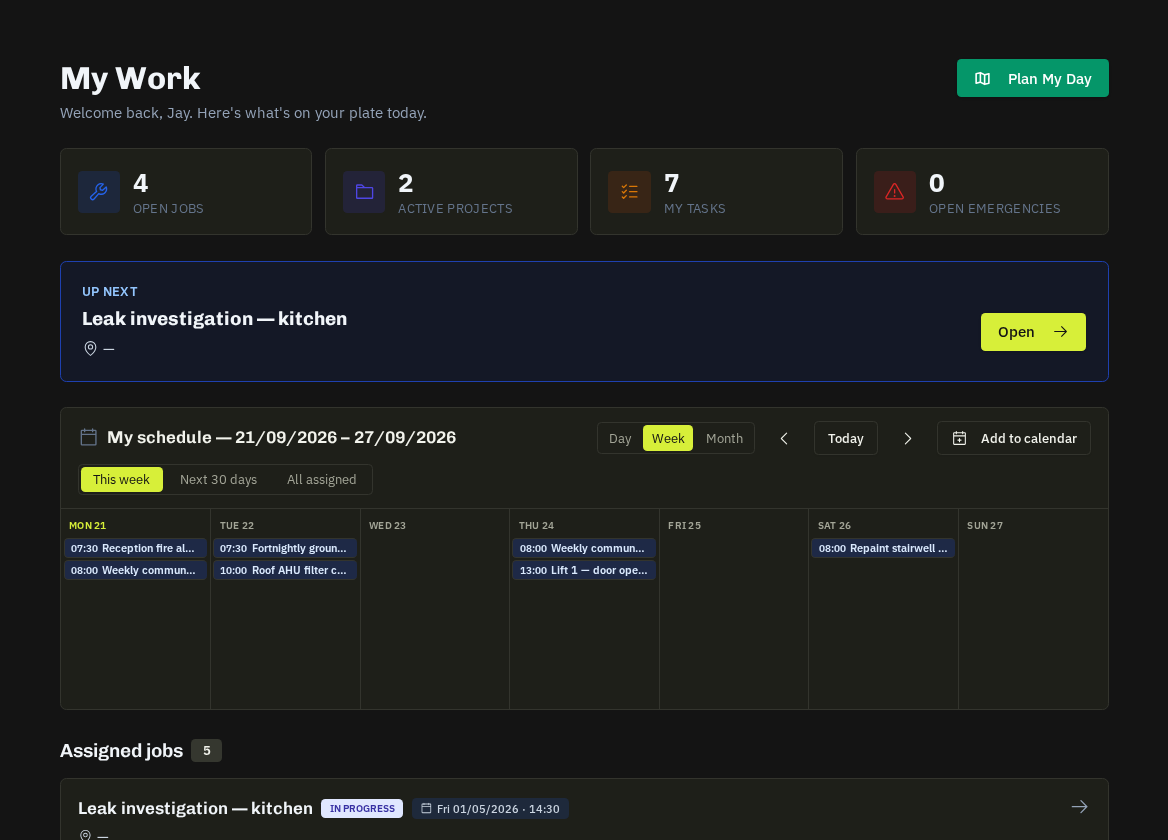
Morning briefing
At 06:30 on days you have work you receive an email listing the day's jobs and, if you've set a home location, your optimised route with ETAs and a 'Start navigation' button.
Related: Reading a job page · Route Planner