Help centre / Job Requests & Quotes
Job requests: the pipeline
From a client's request to an awarded, converted job — every stage explained.
A job request (JR) is work that hasn't been priced or approved yet. It is the front of the funnel: everything a client asks for starts here, and nothing becomes a job until it has a price (or a mandate) and an approval.
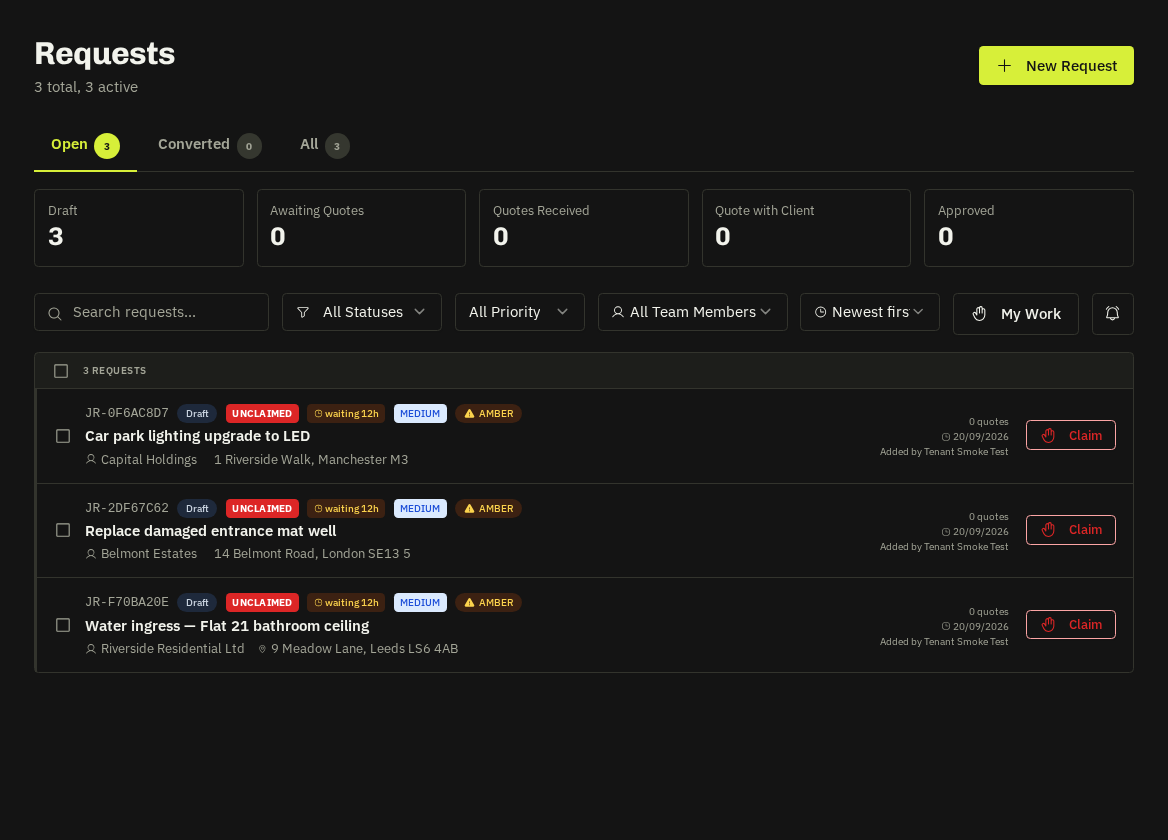
Where requests come from
- Client portal — a portal chip marks them.
- Tenant report forms — public links / QR codes for residents.
- WhatsApp and email intake — parsed into a draft for you to tidy.
- Your team — Requests → New Request.
Stages
| Stage | Meaning | Who moves it |
|---|---|---|
| New / Draft | Just arrived, unclaimed | — |
| Under review | An admin has claimed it | Claim button |
| Awaiting quotes | Suppliers invited | Invite / Request Quotes |
| Quotes received | At least one quote in | Automatic |
| Sent to client | Recommended quote sent for approval | Send to client |
| Approved / Declined | Client decided | Client, or you on their behalf |
| Converted | A job now exists | Convert to Job |
| On hold | Paused — SLAs stop counting | Hold / Resume |
List behaviours
- Unclaimed requests float to the top; urgent priority floats above other unclaimed ones.
- Newest / oldest toggle is remembered per browser.
- Badges: price mandate (client pre-authorised a spend limit), portal, and the SLA beacon (amber after 2 working days without a quote, red after 4 without a quote sent — thresholds in Settings → Quote SLAs).
Price-mandate requests
The client has authorised spend up to a limit, so you can review, schedule and convert without quoting. If the job will exceed the limit, pause and send a quote first — the mandate is a ceiling, not a blank cheque.
Tip: Claim before you work. Claiming tells colleagues it's in hand and starts your personal SLA clock.
Related: Create a job request · Request supplier quotes · Quote SLAs · Convert a request to a job