Help centre / Communications & Inbox
The e-mail Inbox: e-mails become requests
Connect your maintenance mailbox so incoming e-mails turn into job requests, threads and jobs.
Communications → Inbox connects your company's maintenance mailbox (IMAP). Every minute or so Fixlr pulls unread e-mails, cleans them (quoted text stripped, attachments kept), matches the sender to a client, guesses the priority from urgent words and lists them as inbox items.
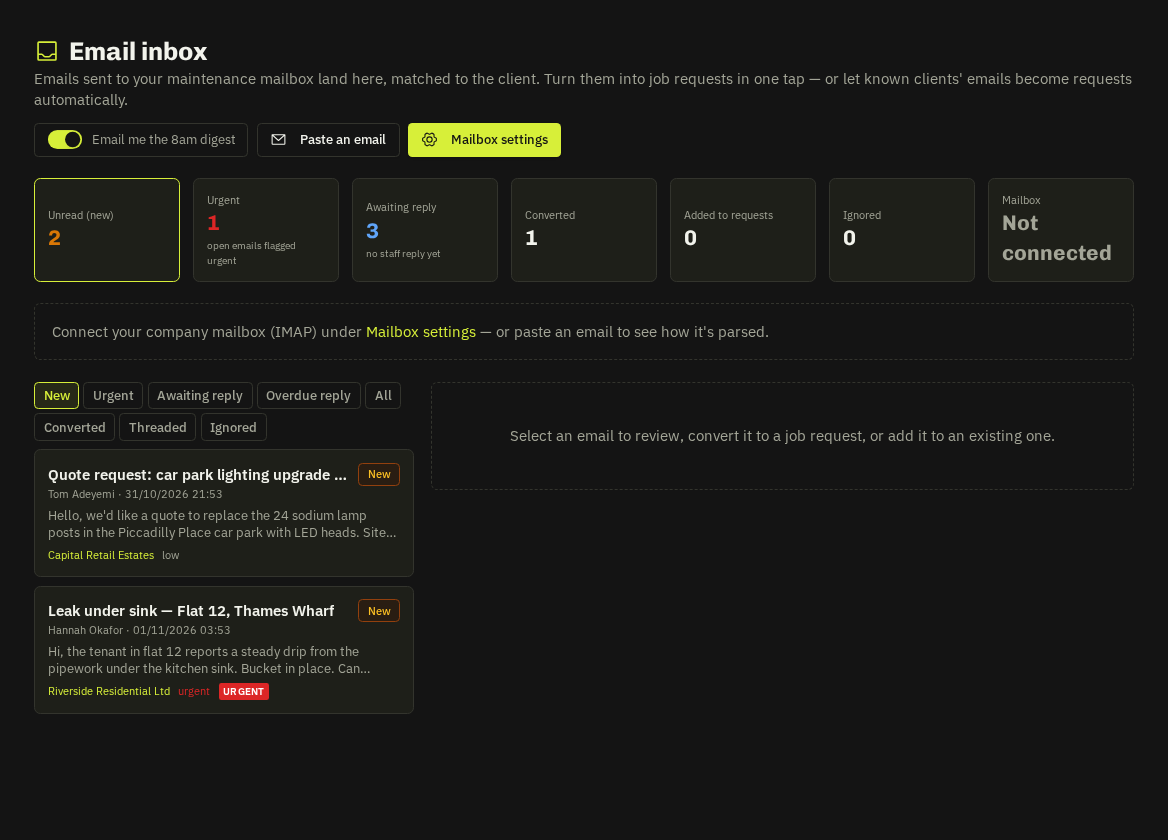
For each e-mail you can
- Convert to a job request — the e-mail text becomes the description, photos become attachments, the sender becomes the requester.
- Add to an existing request — replies that quote a
JR-…reference thread themselves automatically. - Reply from the inbox with attachments picked from the e-mail, the request or job, quote PDFs, RAMS, completed forms or an upload. Replies are logged on the request.
- Ignore — auto-replies and bulk mail are ignored for you.
E-mails from known clients can become requests automatically (Auto-create). The sender is acknowledged when their e-mail becomes a request, when a reply is threaded and when the request becomes a job; inbox-sourced jobs also e-mail the requester when scheduled, when the engineer taps On my way (with ETA) and when completed — six templates you can word per client.
Tiles and filters
Unread · Urgent · Awaiting reply tiles sit at the top. Awaiting reply lists e-mails nobody has answered yet; after the nudge limit they turn amber.
Tip: No mailbox yet? Paste an e-mail imports a raw message so you can try the flow.
Related: Mailbox settings · Reply nudges, snooze & the 8am digest · AI scope of works & photos