Help centre / Jobs, Emergencies & Works Orders
Emergency jobs
Response tiers, urgent dispatch, the contact card and what the client sees.
Emergency jobs (EMG-…) are the work that can't wait — a burst pipe, no heating in winter, a lift stuck. They carry a response tier with a visible clock and their own list so they never get lost among routine work.
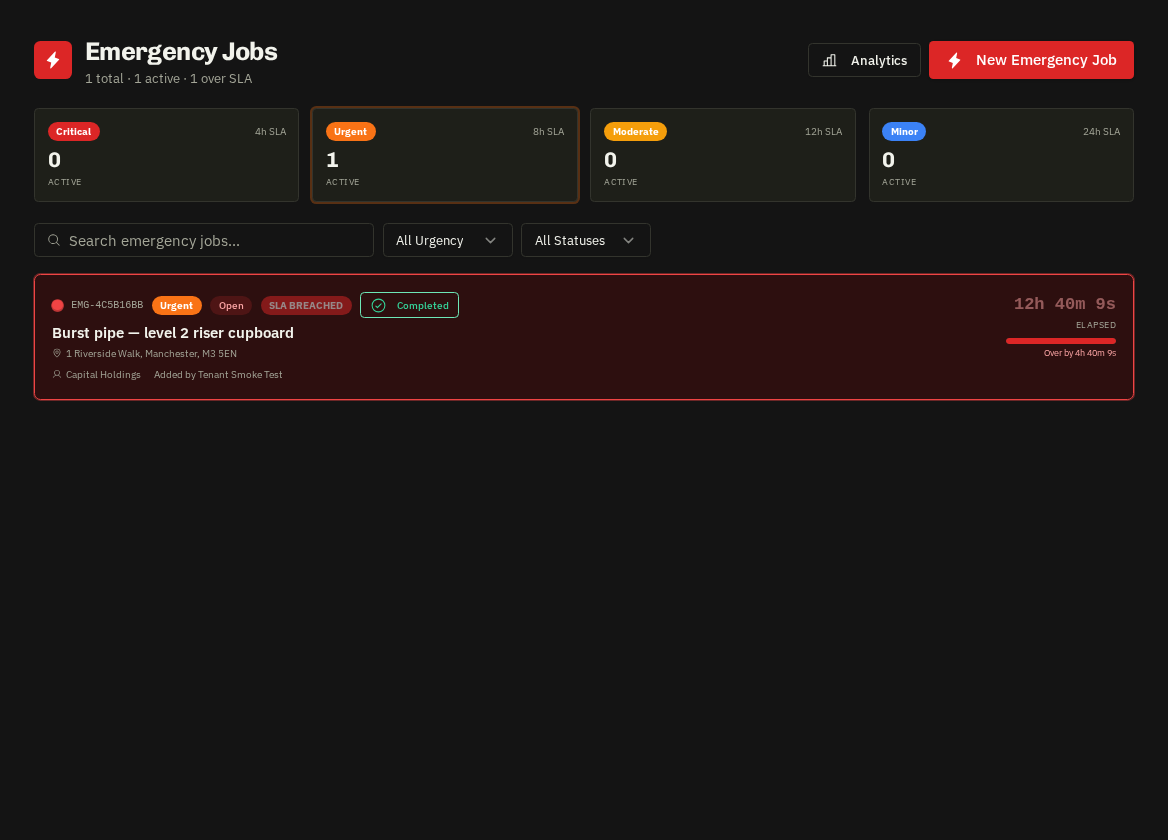
Response tiers
| Tier | Response target |
|---|---|
| Critical | 4 hours |
| Urgent | 8 hours |
| Moderate | 12 hours |
| Minor | 24 hours |
The clock starts when the emergency is raised; the page and the list show time remaining and turn red when breached.
How they arrive
Clients raise them from their portal (Report Emergency) or by phone; your team is alerted instantly by email, in-app and (if enabled) SMS. Admins can also create them directly.
Dispatch
- Assign a supplier with the searchable picker (or add a new off-system supplier on the spot) or an in-house operative.
- The supplier's urgent email and SMS include address, what3words, category, instructions and the property's access notes.
- The assigned supplier's contact card appears on the page with tel / mailto links and a Change Supplier button.
Works order and completion
- Raise Works Order in the header opens the wizard pre-filled with the emergency.
- On completion the Raise Invoice call-to-action appears; portal clients see progress, photos and the invoice.
Warning: Emergency Jobs is a plan add-on. Without it the section is hidden and clients can't raise emergencies from their portal.
Related: Assign a supplier · Works orders · Property access notes on dispatch