Help centre / Getting Started
Your dashboard
Reading the tiles, the Active Work list, Upcoming Visits and Recent Invoices.
The dashboard is your live snapshot. Everything on it is clickable.
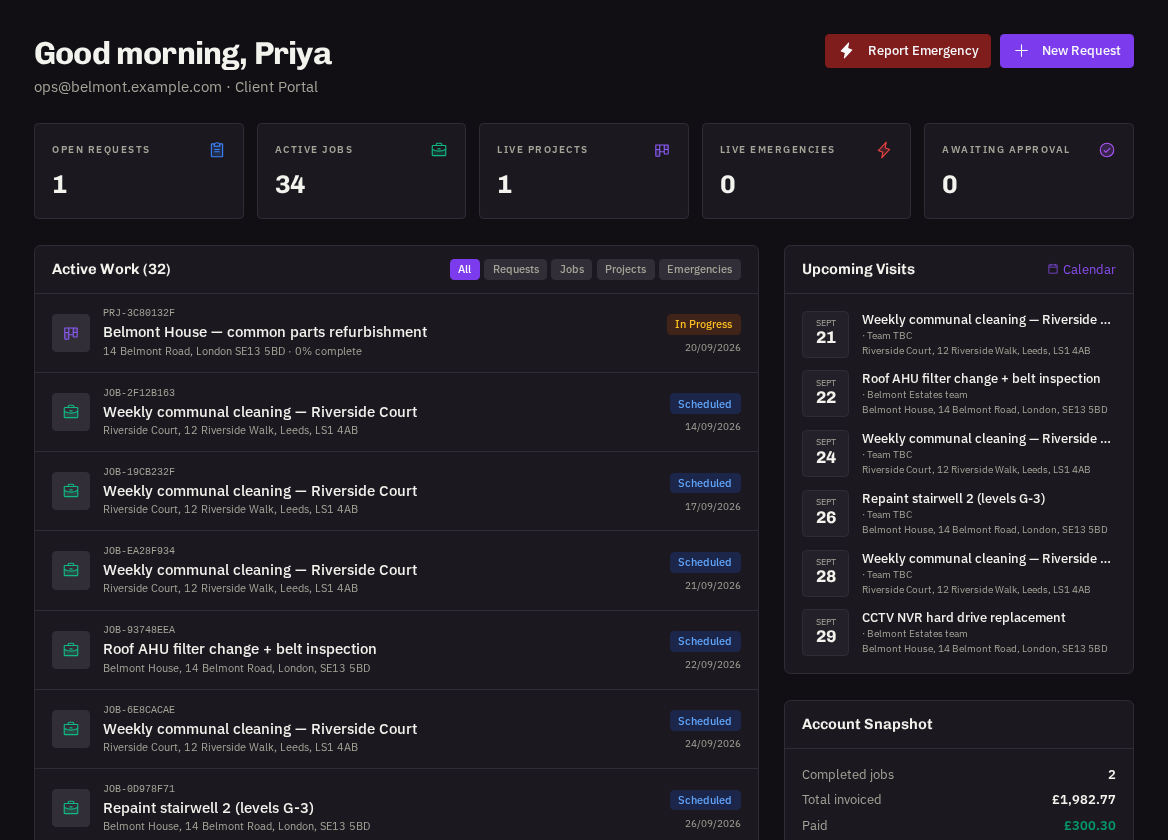
Tiles across the top
Open Requests (raised but not yet turned into a job), Awaiting Approval (quotes waiting for an Administrator's decision — the most important tile to keep at zero), Active Jobs, Live Emergencies and Live Projects.
- Active Work: every job, emergency and project currently in progress, with its status chip. Open any row for the full page.
- Upcoming Visits: the next scheduled jobs and contract visits across your properties, in date order — handy for warning site staff who's coming when.
- Recent Invoices: the latest invoices with their status (Awaiting Payment, Overdue, Paid). Press one to view or confirm payment.
- Account Snapshot: your organisation, your portal role and quick links to Properties and Team.
Tip: if a tile shows a number you didn't expect, click it — the filtered list explains it.
Related: Following a request · Following a job · Invoices, PO numbers & confirming payment