Help centre / Invoicing
Client PO numbers on invoices
Where the PO number is entered, where it prints and how contracts handle per-visit POs.
Many clients will only pay against their own purchase order number. Fixlr treats it as a first-class field:
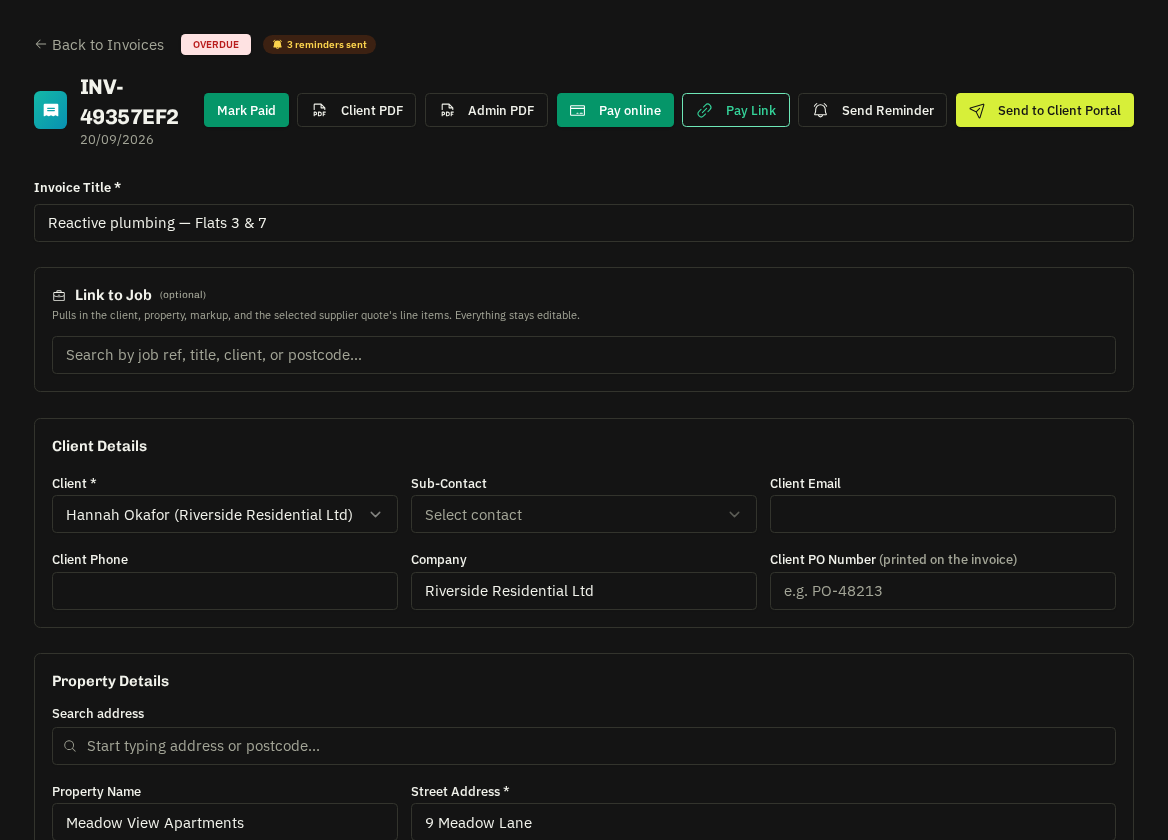
- Enter it — in the invoice editor (Client Details → Client PO Number), on a contract visit's billing row at invoicing, or as a default on a contract. It shows as an amber PO chip in the invoice header and list.
- It prints — on the invoice PDF ('Client PO:' beneath the reference), appears in the send-to-portal email ('Your PO') and in the client portal's invoice view.
- Search — the Invoices list by PO number to find the invoice a client is querying.
Contracts
POs are normally issued per visit, so enter them when ticking visits on the Invoicing tab; each per-visit invoice carries its own PO, combined invoices show per-line POs when they differ.
Related: Invoices: raising & sending · Contract invoicing