Help centre / Insights & Monitoring
Budgets: caps per client or property with breach warnings
Set a spend limit, watch invoiced and uninvoiced costs against it, and make approvers acknowledge a breach.
Budgets (top-level menu) tracks spend against a limit for a client, or for one property of that client, over a period.
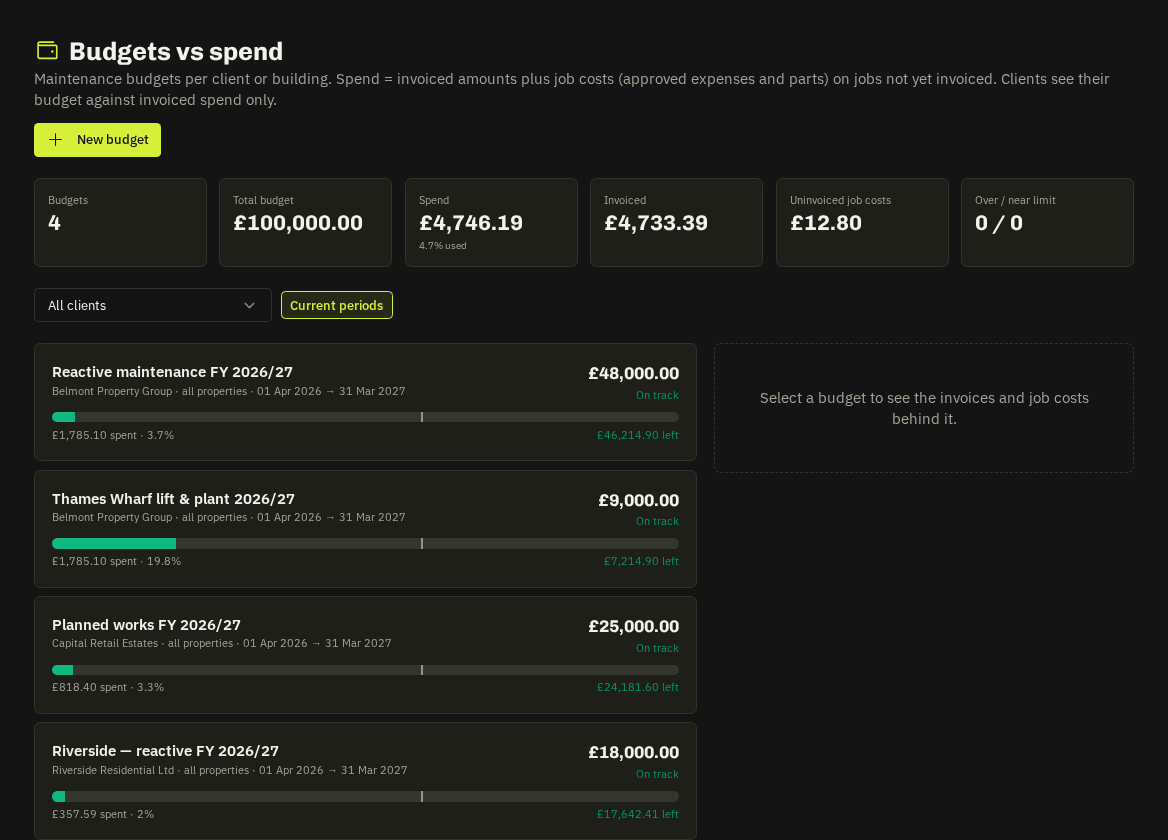
Create a budget
New budget → client, optional property (blank = the whole client), a name such as Reactive maintenance FY26/27, the amount (£), the period, and Alert the office at (%) — the level at which admins are notified.
What counts as spend
- Invoiced — invoices raised in the period (ex VAT).
- Uninvoiced job costs — approved expenses and parts on jobs that haven't been invoiced yet.
- Projected at run-rate — where the budget will land if the current pace continues.
Select a budget to see the invoices and job costs behind the numbers; the tiles show total budget, spend, invoiced and how many budgets are over / near limit.
Breach warning
Approving or selecting a quote, or converting a request to a job, that would take a budget over its limit shows a red budget breach banner. The approver must tick to acknowledge before continuing; the acknowledgement is stored on the job and in the audit log.
Note: Clients with portal access see their own budgets (invoiced spend only) under portal → Budgets.
Related: Select & award a quote · Job profit